
 Search Your Electricity Bill
To check your MEPCO bill, enter your 14-digit Bill reference number or 10-digit customer ID in the above given tool, click the “Submit” button, and you’ll be redirected to your bill which is sourced from PITC.
Note: If the status of your MEPCO bill online is “R” (“R” is for MEPCO net metering connections), choose “R” from the dropdown. And if the bill status is “U”, choose “U” from the dropdown. This status is shown in front of your 14-digit reference number, see the following image:
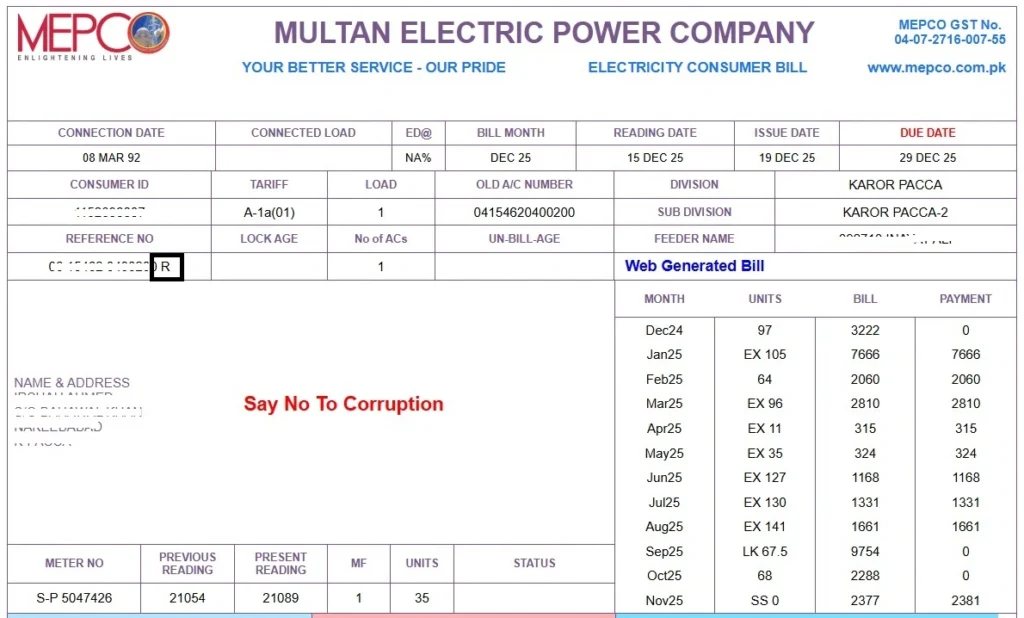
How to find Reference Number and Consumer ID in your MEPCO Bill?
Your 14-digit reference number and 10-digit consumer ID are mentioned at the top left corner of your MEPCO Bill. Look at the following MEPCO bill photo:
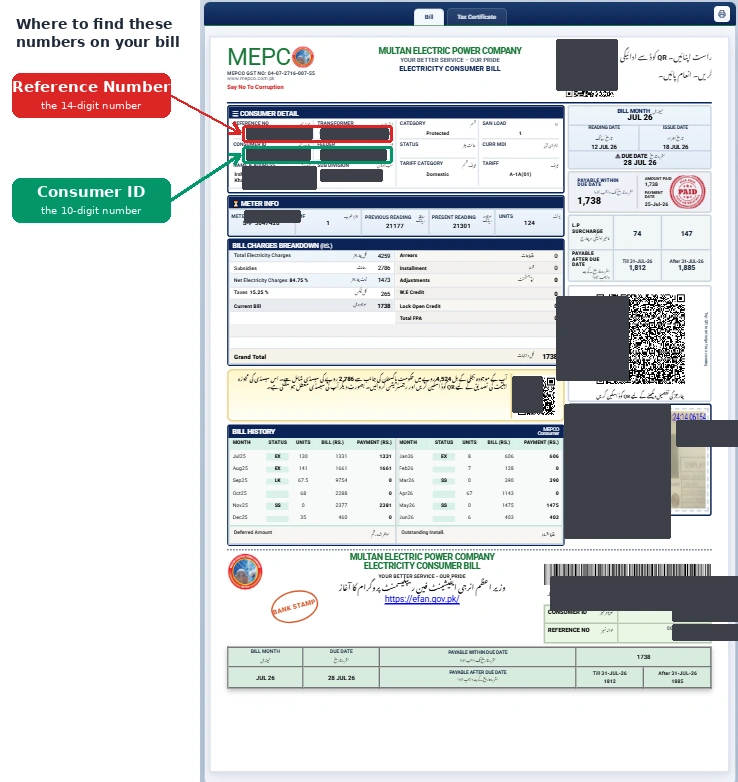
MEPCO Bill New Format
On Wednesday, June 17, 2026, MEPCO introduced new bill format for the electricity consumers. In this new MEPCO bill format all the information is presented in a simple and more organized way. These updates help the MEPCO bill users easily understand their bill. This new MEPCO bill format has 6 sections, which are as follows:
- Section #1: Consumer Details
- Section #2: Meter Details
- Section #3: Bill Charges Breakdown
- Section #4: Bill History
- Section #5: Bill Month
- Section #6: MEPCO Bill Charges After Due Date
The following is the image of new MEPCO Bill format:
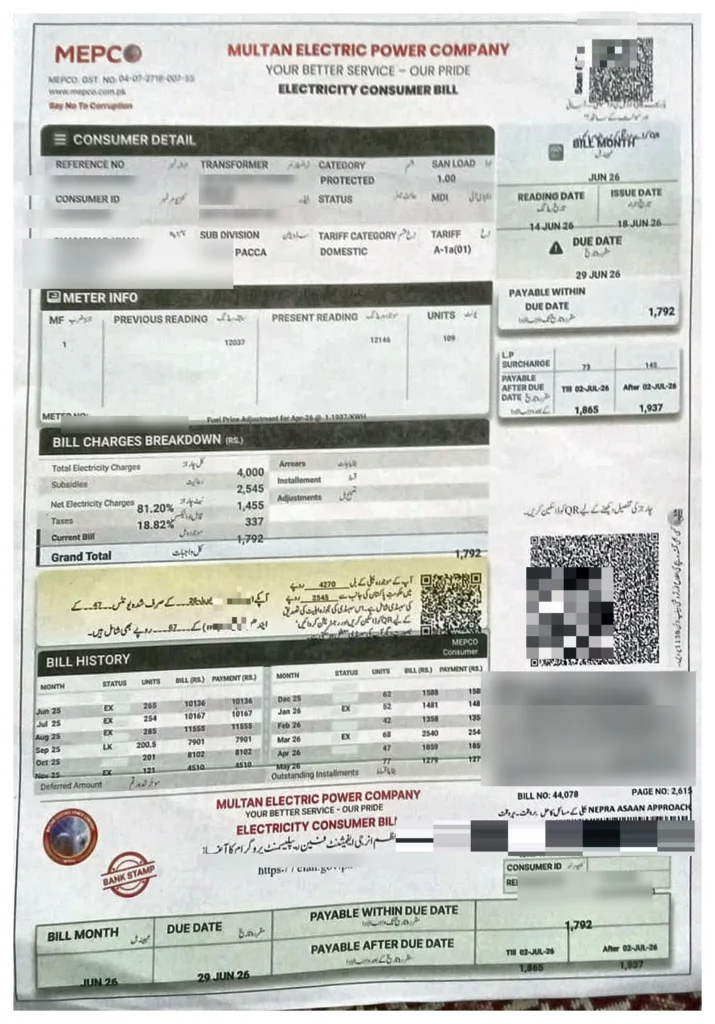
Note: Some details are hidden in the given MEPCO Bill image for privacy reason
What is MEPCO
MEPCO (Multan Electric Power Company) is a government owned electricity distribution company in Pakistan. It is responsible for the distribution of electricity in 13 districts of South Punjab. It also issues electricity bills and maintains power infrastructure across this region.
It was established in 1998. It operates under PEPCO (Pakistan Electric Power Company), and follows the policies and rules of NEPRA (National Electric Power Regulatory Authority).
Today MEPCO serves 8,915,282 customers across South Punjab. It has 159 grid stations, 1945 feeders, 205,000+ transformers, and 128,239Km HT/LT Lines. It provides the facility to check bijli bills online as well.
Note: You can see MEPCO bill through MEPCO web bill or MEPCO bill app.
⚡ MEPCO Service Coverage Areas
MEPCO (Multan Electric Power Company) provides electricity distribution services across the following major districts of South Punjab.
Origin of MEPCO
The origin of MEPCO electric is traced back to the 1922 (British India-era) when MEPCO was established under the name Multan Power Supply Company. After the independence in 1947, Multan Power Supply Company came under the governance of government of Pakistan, and in 1972 it was nationalized.
After nationalization, the electricity distribution, billing, and management was managed centrally by WAPDA. For Multan region WAPDA had its sub-unit called the Multan Area Electricity Board (MAEB). The MAEB was responsible for supplying electricity to the consumers of this region.
But with the population growth, the energy demand also increased. To meet this demand, the government of Pakistan decided to unfold WAPDA. As a result of this unfolding, several DISCOs (Distribution Companies) like MEPCO, QESCO, FESCO, GEPCO, LESCO etc. were established.
MEPCO was formally established on May 14, 1998, and started its operations on June 09, 1998 after taking over the assets, staff, and infrastructure from the former Multan Area Electricity Board.
What is MEPCO Bill
A MEPCO Bill is a monthly electricity bill invoice that MEPCO users receive every month. It shows the total amount they have to pay for the electricity units (bijli) they have consumed. This bill is also called bijli ka bill.
In this bijli bill, MEPCO charges and other government taxes are included. The implication of these taxes is different for each category of electricity consumer, such as residential, commercial, or industrial etc.
What is MEPCO Duplicate Bill
Let’s say you have lost the original bill invoice that you got from MEPCO, or you haven’t received any invoice at all. In this situation, what you can do is get a copy of your bill online. This copy is called a MEPCO Duplicate Bill.
The easiest way to get this duplicate bill is from mepcoonline.com.pk. Just enter your reference number or consumer ID, click the “Submit” button, and you will be redirected to your bill page. On this page you will see a green button named “Print”. Click it, and your bill will be printed. That printed copy is your MEPCO Duplicate Bill.
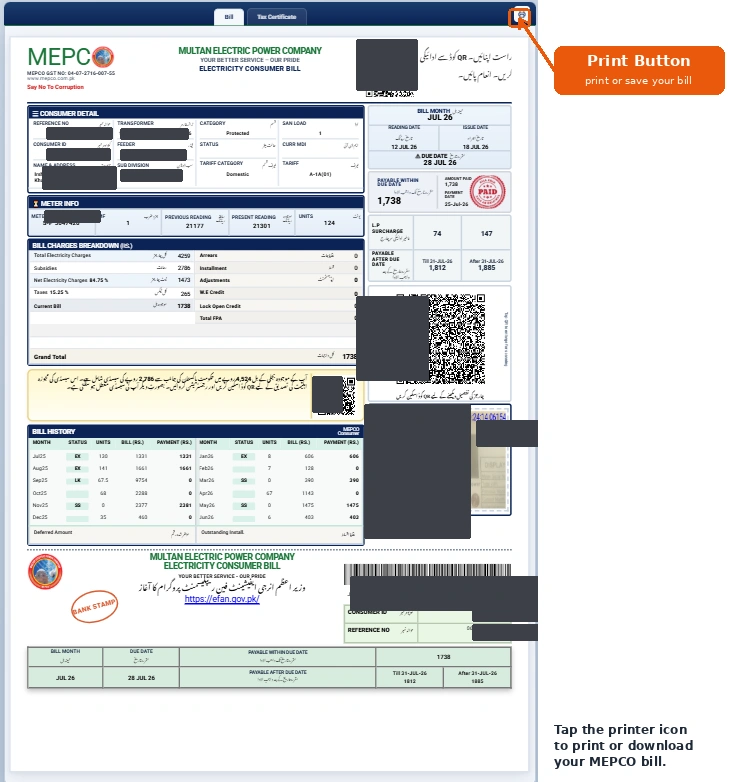
Or you can visit your nearest MEPCO office to get the duplicate copy of your electricity bill.
Is There Any Difference Between an Original and a Duplicate Bill?
There is no practical difference. Both contain:
- A 10-digits consumer ID
- A 14-digits reference number
- Units consumed during the month
- And total amount due.
- Only difference may be a “Duplicate” watermark on the copy.
What are MEPCO Bill Charges?
Your MEPCO bill has two parts. The first is MEPCO’s own charges, the cost of the electricity units you used, plus fixed charges like meter rent. The second is government taxes, such as GST, Electricity Duty, and the TV fee.
Together these decide your total bill. To see exactly how each charge and tax is calculated, with the current rates and a worked example, read our full guide: MEPCO Tariff and Bill Charges Explained.
Tips to Reduce Your MEPCO Bill
It is possible to reduce your monthly MEPCO bill if you manage your electricity units consumption wisely. Following are the tips that you can follow to save money:
Stay Within Lower Tariff Slab
MEPCO charges its electricity consumers based on the tariff slabs. The more units you use, the higher the slab you fall into, and the higher the per-unit rate you pay.
That’s why keep track of your monthly electricity units consumption, and stay in the lower tariff slabs so that you pay a lower per-unit charge.
Avoid MEPCO Peak Hours
Do not use appliances that consume more energy during peak hours. These heavy appliances include washing machines, irons, water pumps, ovens, and AC etc.
Using these appliances during peak hours is not recommended because the per-unit cost of electricity is higher during those hours. Avoiding electricity use at that time will help reduce your bill. You can use it during off-peak hours instead, when the per-unit rate is lower.
The following table shows MEPCO peak hours and off-peak hours:
Season | Month | MEPCO Peak Hours | MEPCO Off-Peak Hours |
Summer | June – August | 7:00 PM – 11:00 PM | Remaining 20 Hours |
Spring / Autumn | March – May, September – November | 6:00 PM – 10:00 PM | Remaining 20 Hours |
Winter | December – February | 5:00 PM – 9:00 PM | Remaining 20 Hours |
How to Check Your MEPCO Online Bill
To check your Bijli (MEPCO) ka Bill online, put your reference number or consumer ID in the following tool, click “Submit”, and you will be redirected to your bill.
Search Your Electricity BillMEPCO Bill SMS Service
You can do MEPCO bill check via SMS. To check your MEPCO bill through SMS, you just have to type “PITC <14-digit Reference Number>”, and send it to 8075.
Another MEPCO SMS service that you can get is by typing “REF <14-digit Reference Number>”, and sending it to 8334.
How to pay your MEPCO Online Bill?
Paying MEPCO Bill Online is exceptionally easy, and it does not take more than 2 minutes to pay your bijli ka bill. You can pay your MEPCO Bill through Jazcash, Easypaisa, or different banking apps.
MEPCO Bill Payment Using Jazcash
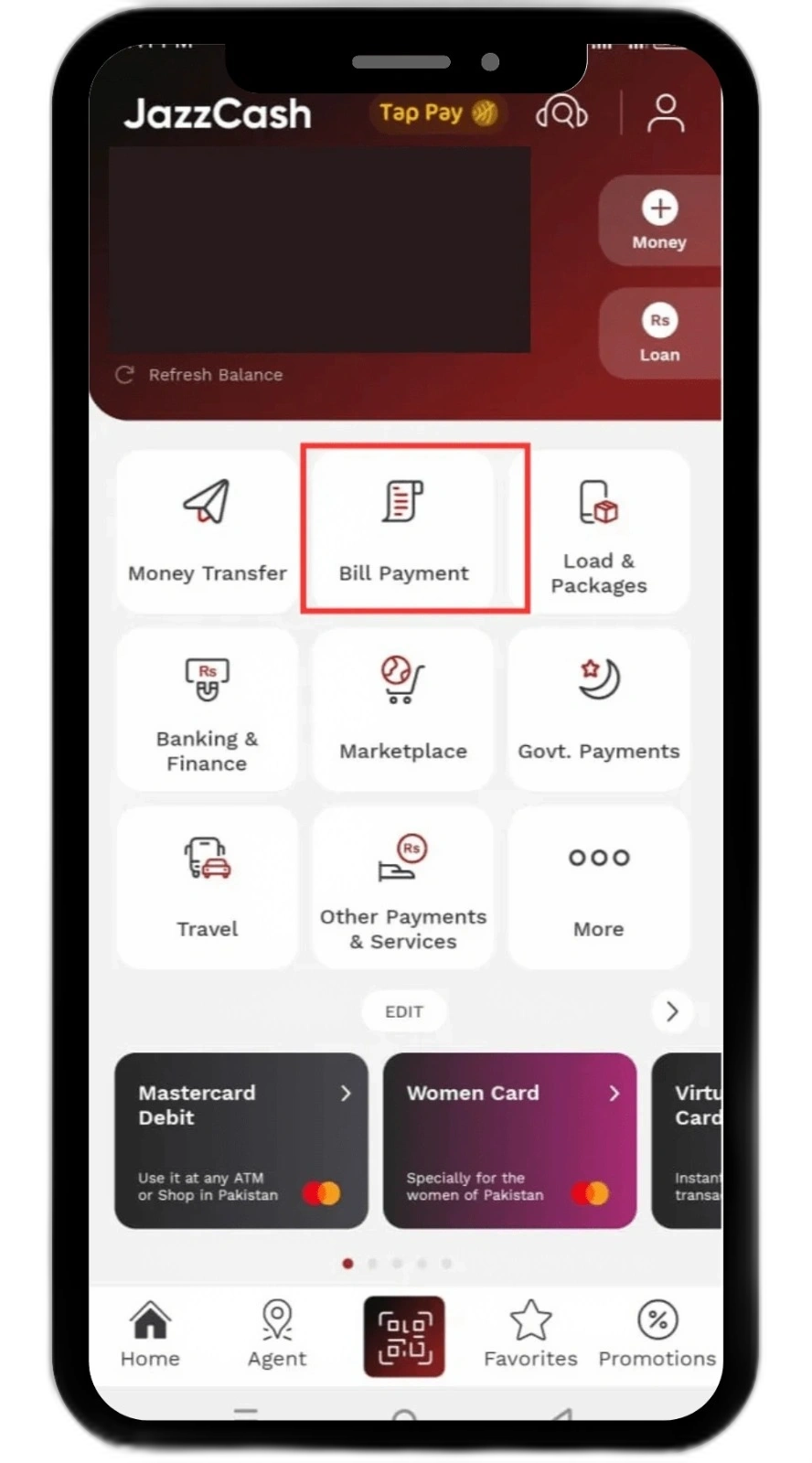
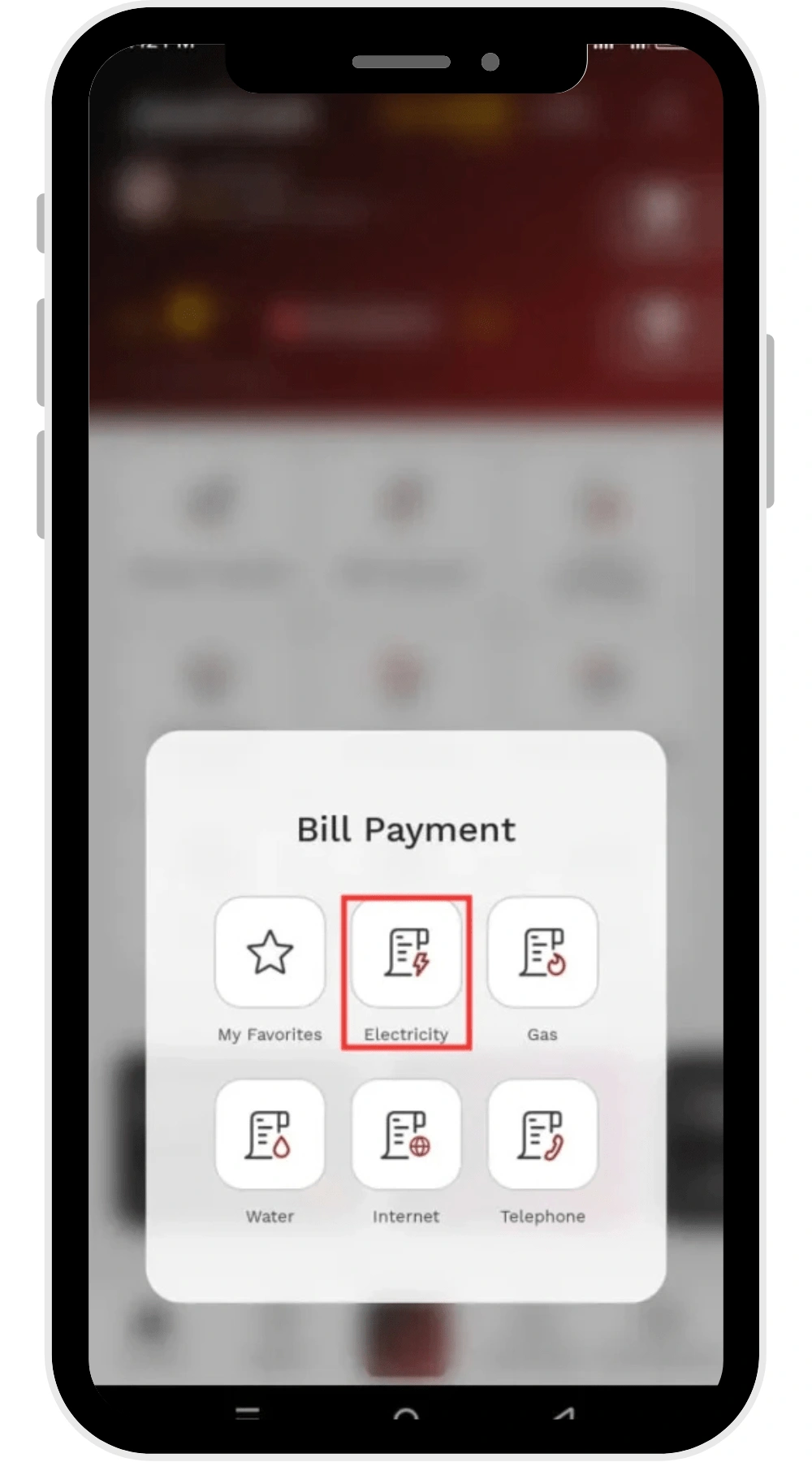
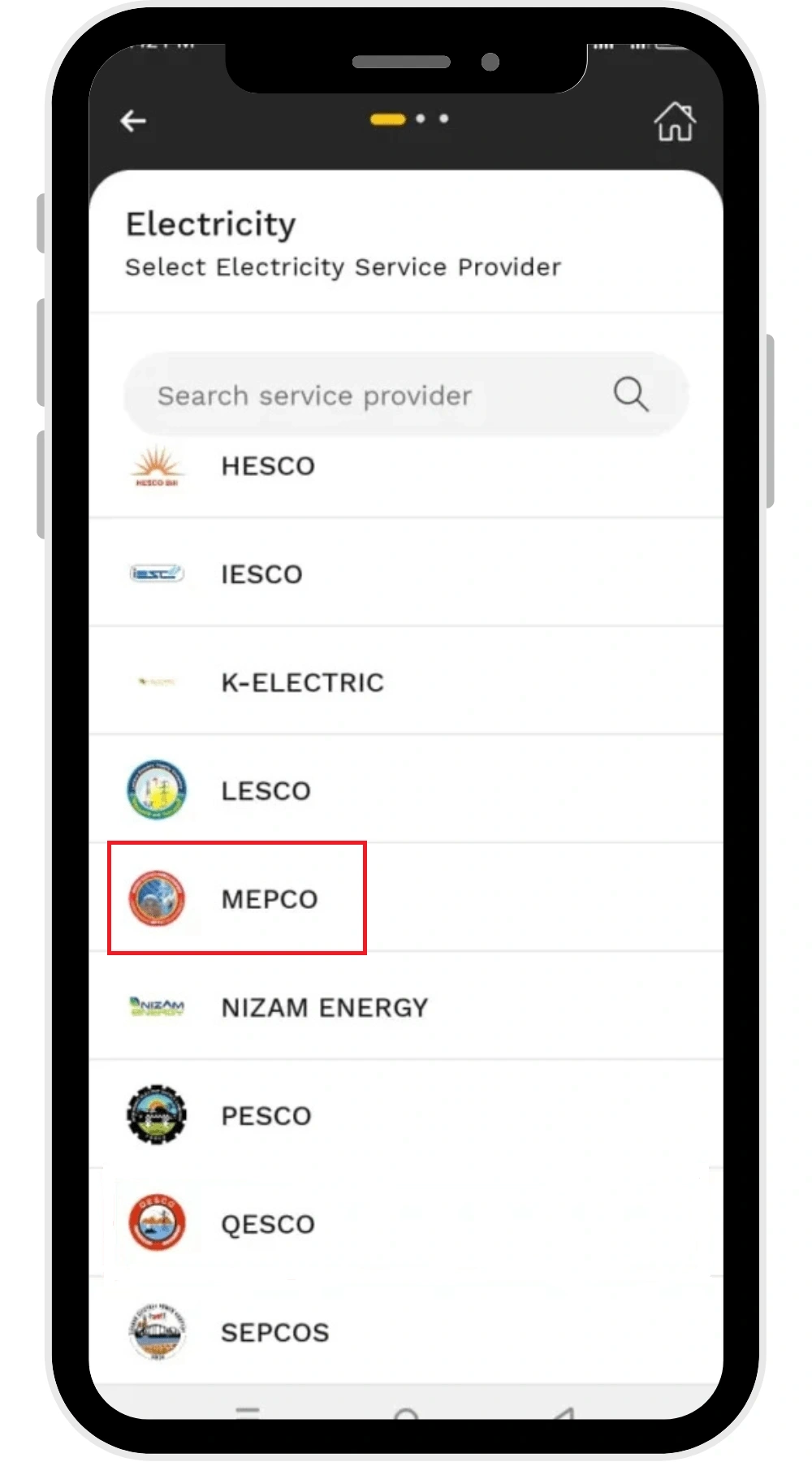
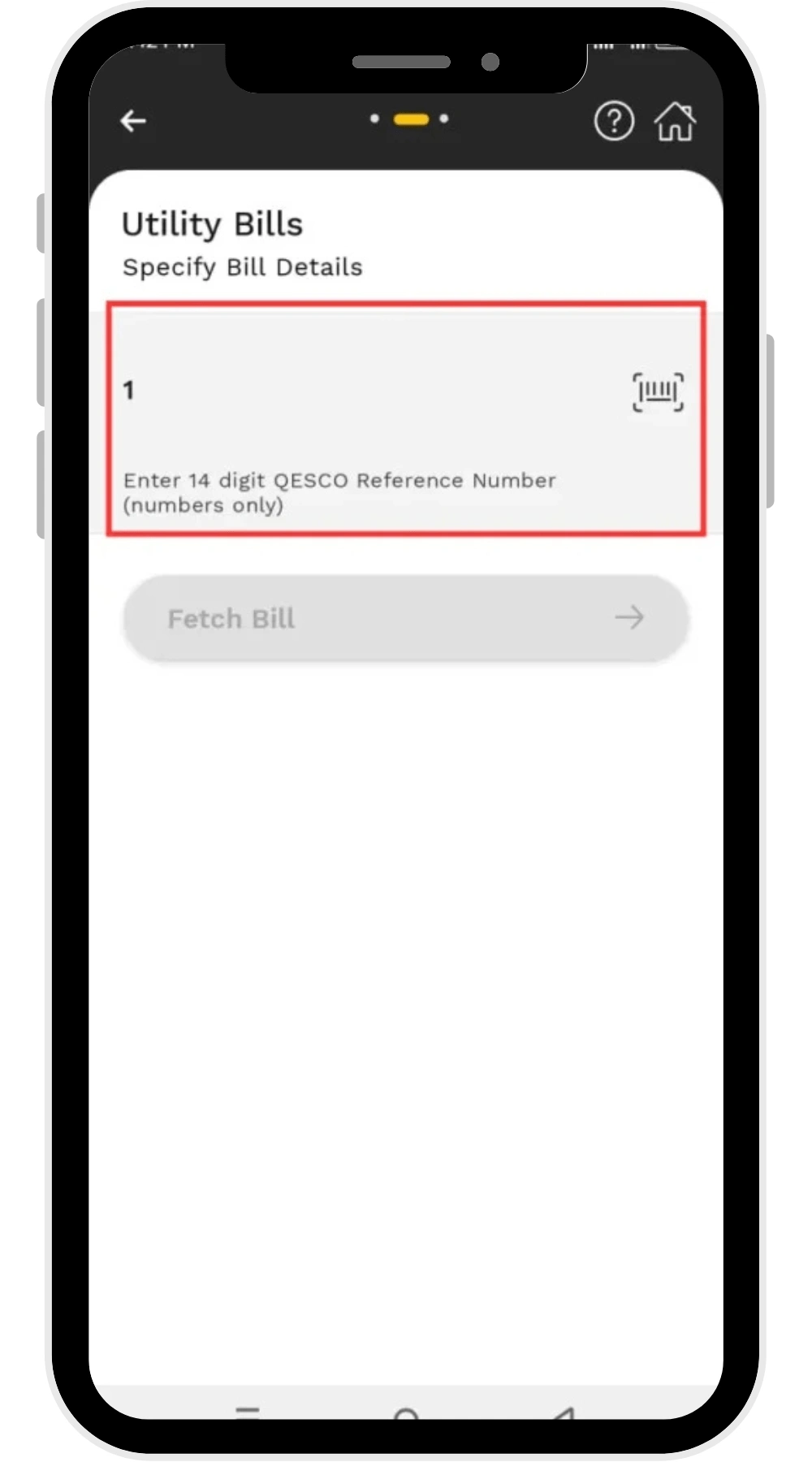
Follow the following steps to pay your bijli bill through Jazcash:
- Login to your Jazcash account
- Tap “Bill Payment”
- Inside “Bill Payment” option you will find “Electricity” (Tap at “Electricity”)
- Choose MEPCO
- Enter your 14 digit MEPCO reference number
- Confirm the payment
MEPCO Bill Payment Using Easypaisa
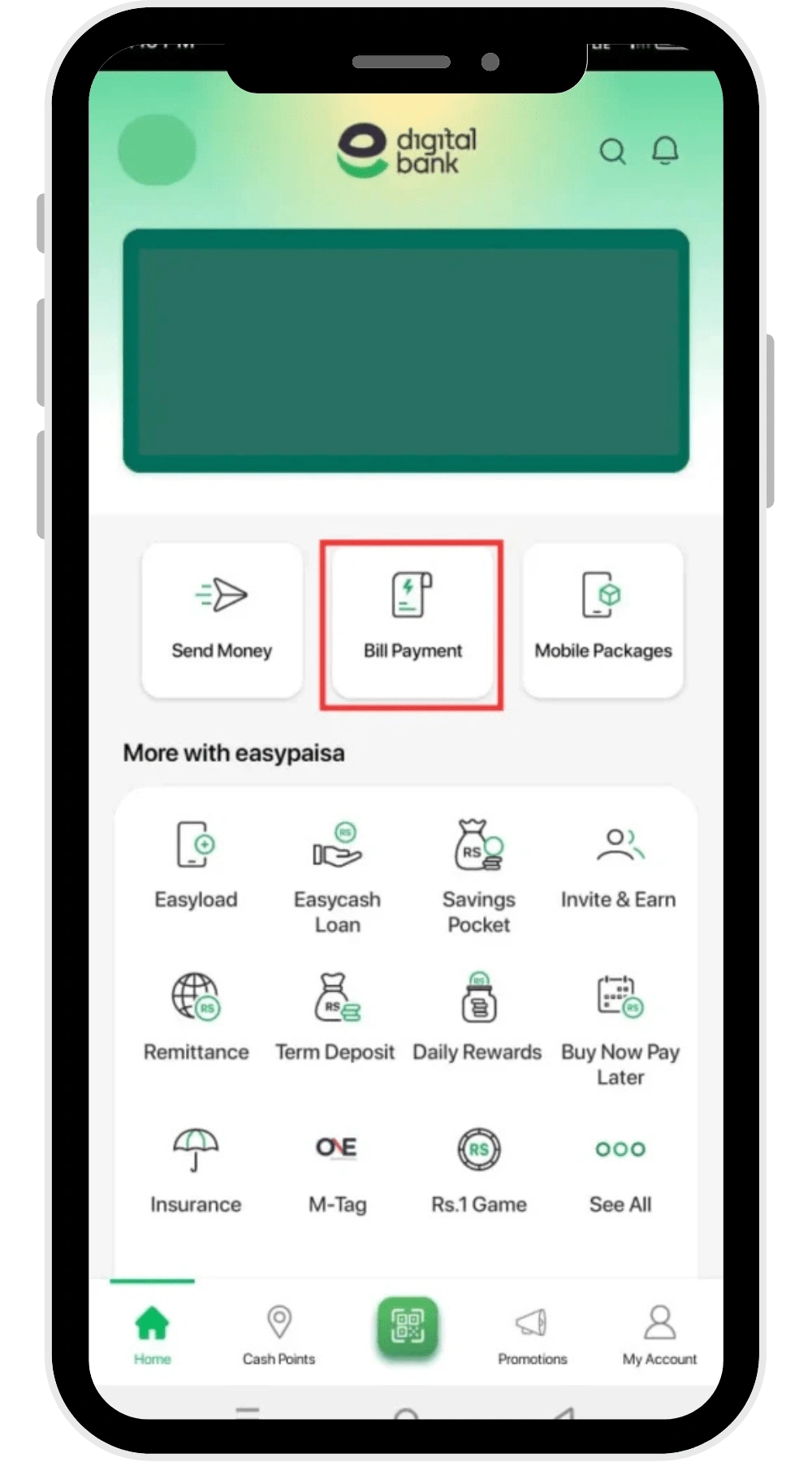
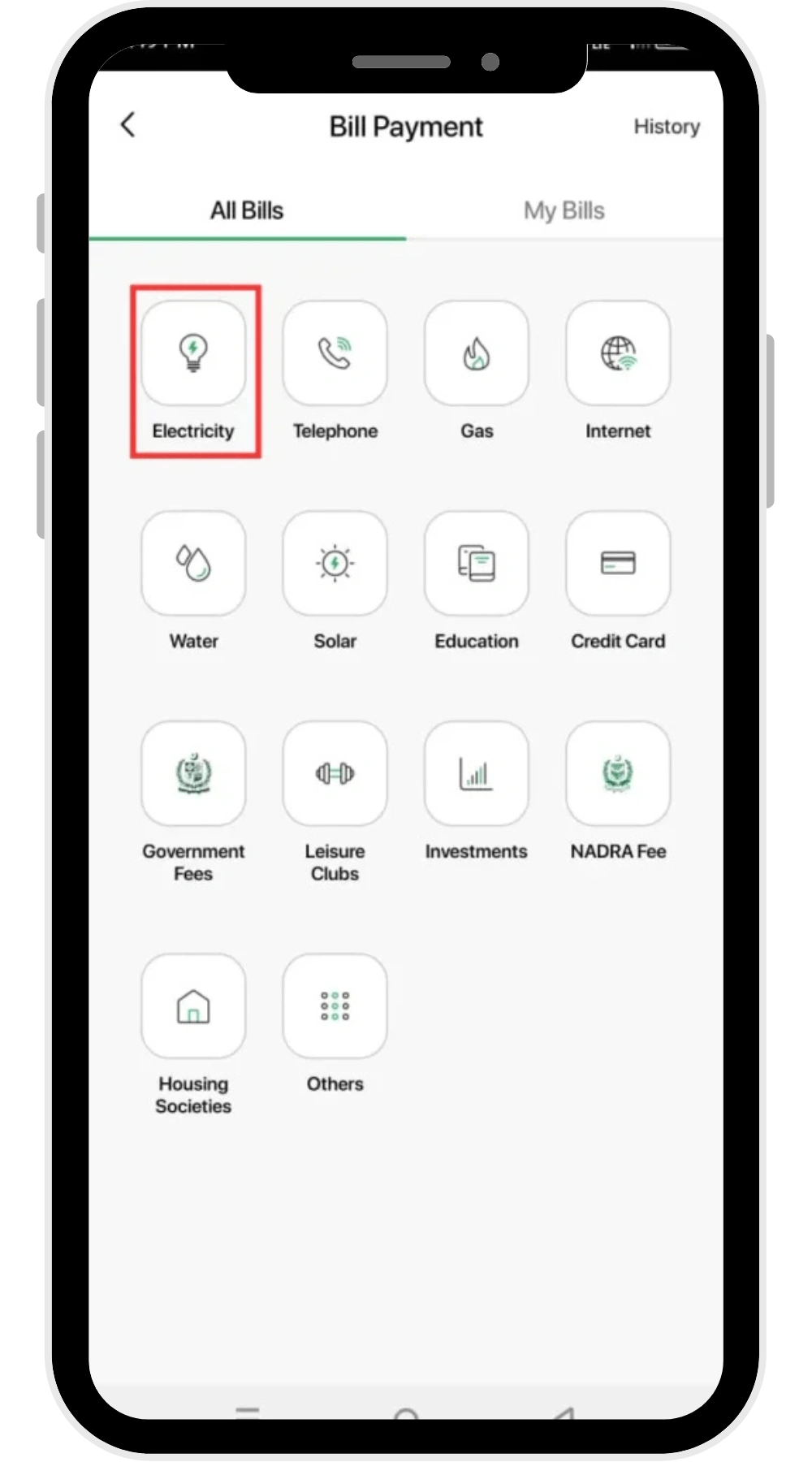
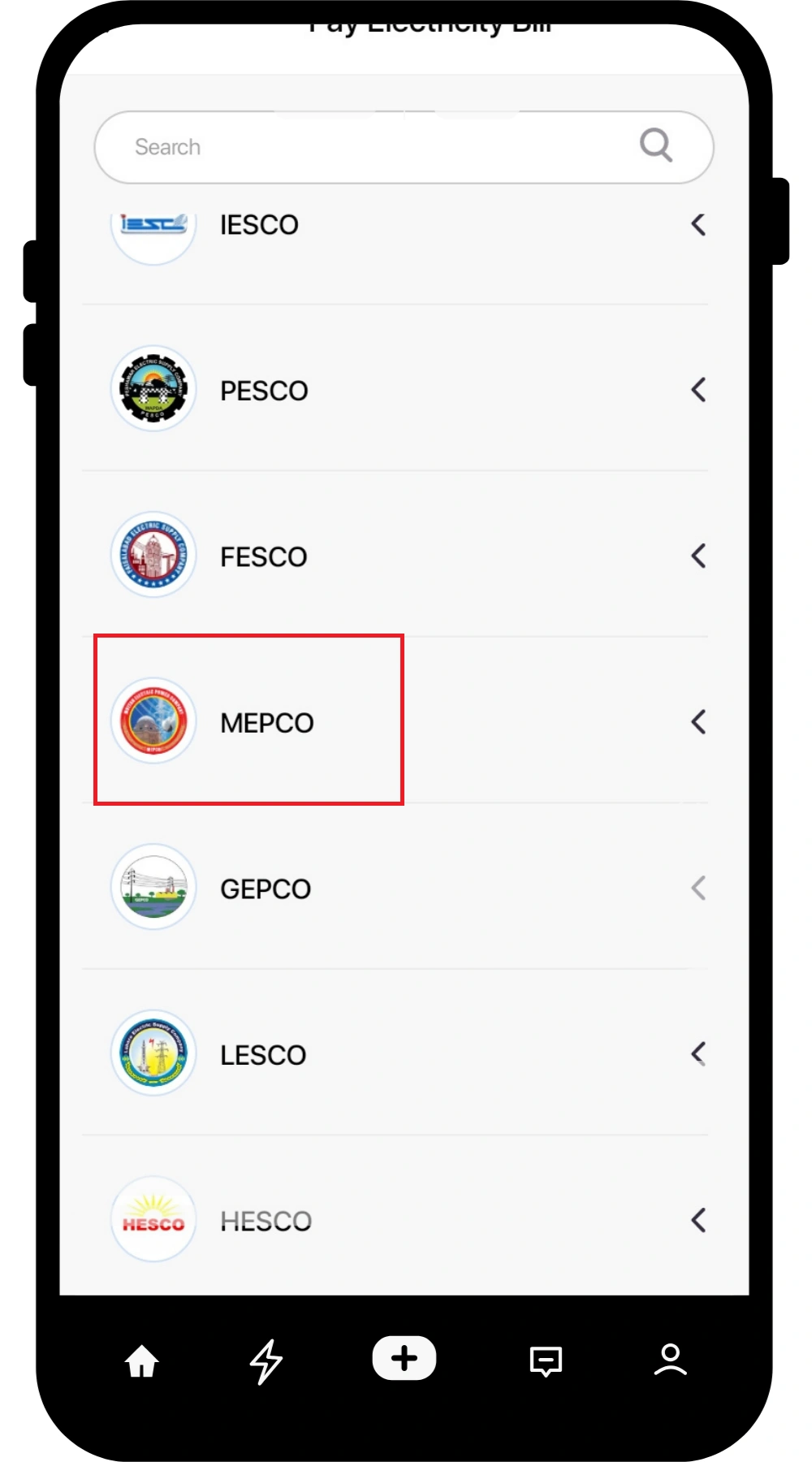
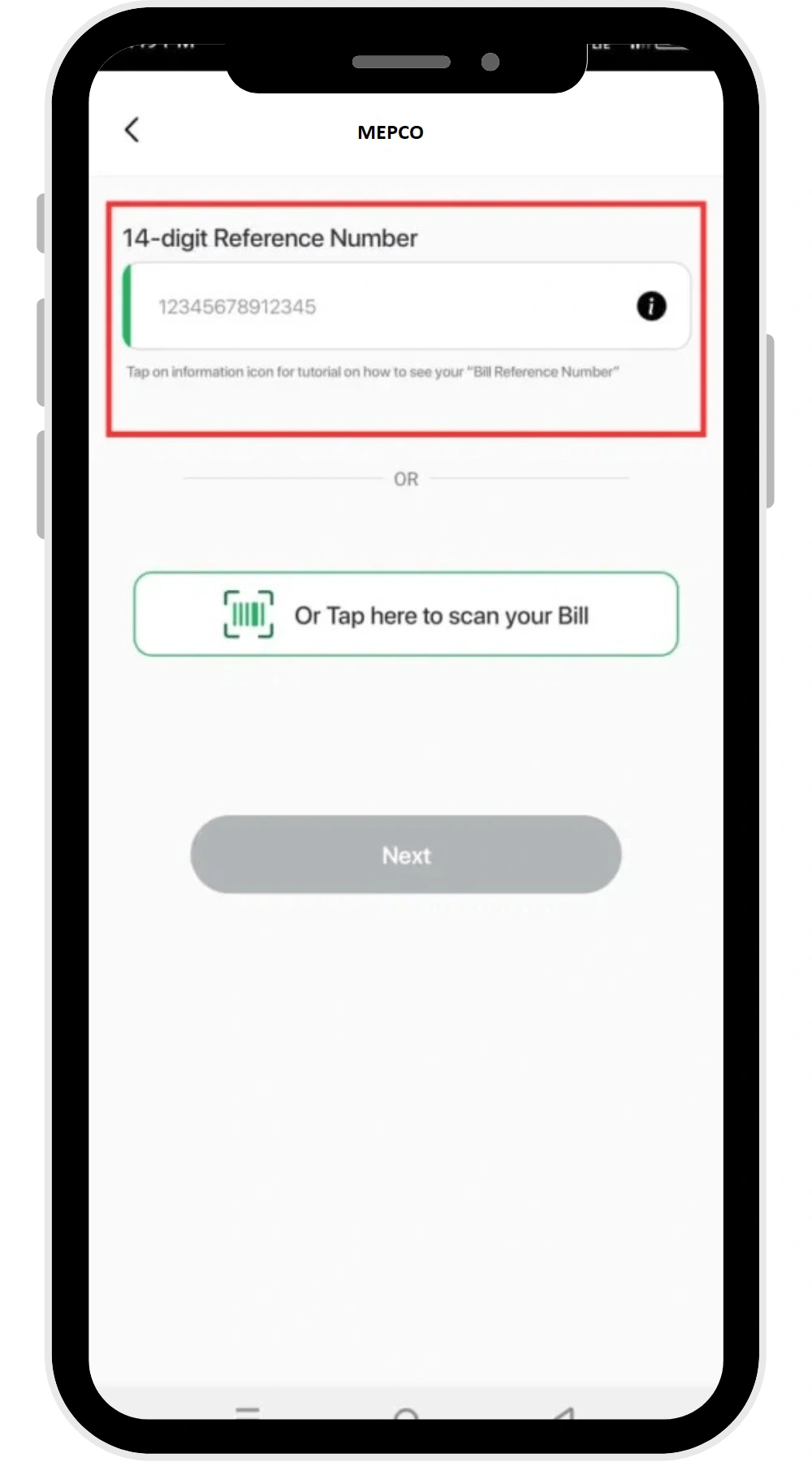
By using the following simple steps, you can pay your electricity bill easily:
- Login to your Easypaisa account
- Tap “Bill Payment”
- Tap “Electricity”
- Choose MEPCO
- Enter your 14 digit MEPCO reference number, or you can choose to scan your bill QR code.
- Confirm the payment
MEPCO Bill Payment Using Bank Apps
Following are the steps that you can use to pay your online bijli ka bill:
- Login to your bank account
- Go to the “Bills” section
- Choose “MEPCO” from the list
- Enter your reference number
- And confirm the payment
How to pay your MEPCO Bill Offline?
Once you have done bijli ka bill online check, then you pay your bijli ka bill for MEPCO. Paying your MEPCO Bill online is easier and faster than paying it offline. But if you still want to pay it by hand, you can do it through the following mediums:
- Physical Stores, such as retail, and mobile shops
- Bank Branches like UBL, HBL, Meezan, MCB etc.
- Post Offices
Go to any of these locations, and pay your electricity bill by hand.
How to check if your MEPCO Bill is paid or not?
You can check your bill payment status by putting your reference number in the MEPCO Bill Check online tool at mepcoonline.com.pk . This will help you to do bijli bill check and its status (paid/unpaid). If your bill is paid, you will see a stamp on it, as shown on the following image:
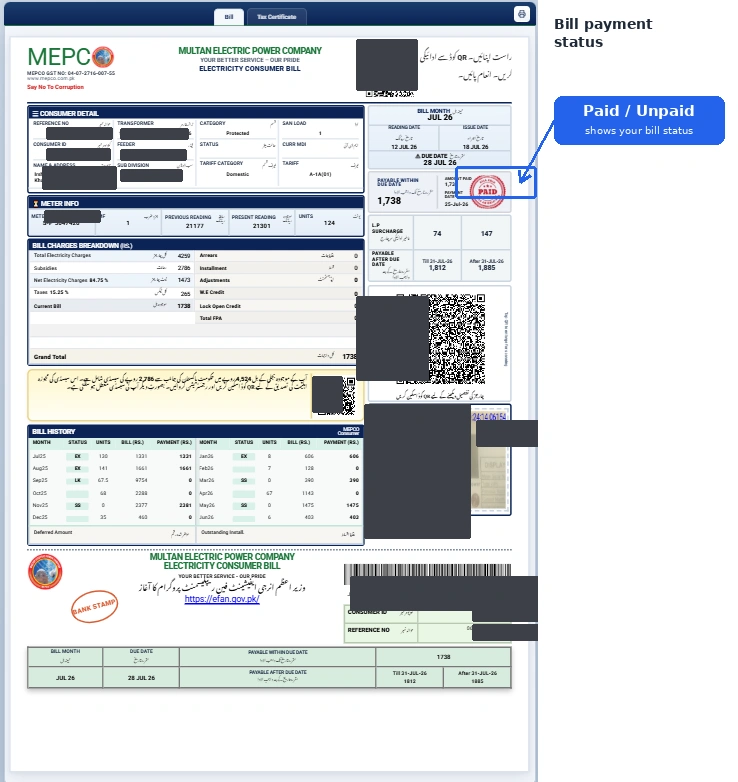
And if this stamp does not appear on your MEPCO bill, or MEPCO Duplicate bill, it means your bill is not paid.
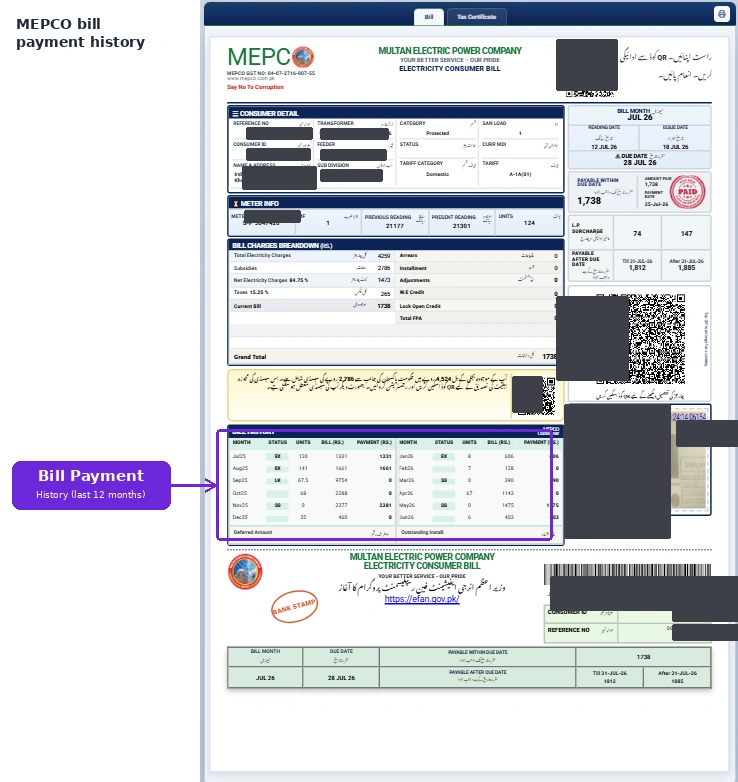
How to check MEPCO Bill payment history?
On the right side of your bill, the history of your last 12 months bill is presented.
MEPCO Complaint Numbers
To report a power outage, billing issue, or any electricity problem, contact MEPCO:
- Helpline (24/7): 0800-63726
- Power Failure: 118 | SMS: 8118
- WhatsApp: 03077848566
You can also submit complaints through the MEPCO apps — MEPCO Smart App, Power Smart App, or MEPCO Light.
For the full department directory and more contact options, see our MEPCO Helpline page.
FAQs
Conclusion
Checking your MEPCO bill online is easy. Just visit mepcoonline.com.pk, enter the reference number or Consumer ID, click the “Submit” button, and your bill will be shown to you.
Online bill checking makes things easier for consumers, letting them check their electricity bills anytime, anywhere through mepcoonline.com.pk.